Your WordPress Website
Was Hacked.
What Happens Next?
Discovering that your WordPress website may have been compromised can be unsettling. Understanding the warning signs, possible consequences, and first decisions can help you respond with greater confidence.
You have barely started your Monday morning coffee and decide to check your website, only to discover an unpleasant surprise.
Your homepage is blank, and you cannot access your WordPress administration area.
The immediate concern is:
What happened to my website?
Then comes the practical concern:
What should I do now?
For a website owner, the situation raises concerns about business operations, customer information, and how long the interruption might last.
A developer may encounter the same problem differently, perhaps through suspicious activity discovered during routine maintenance.
Different perspectives, same immediate need: understand what happened before deciding what to do next.
How to Recognize the Signs of a Hacked WordPress Website
A compromised WordPress website may display a blank homepage, unexpected advertisements, malicious redirects, unfamiliar content, or browser security warnings.
Less visible signs include unexpected file modifications, unfamiliar administrator accounts, unauthorized content, and hosting or security notifications.
Spam comments and unusual registrations, particularly on WooCommerce websites, may result from automated bot activity rather than a compromise. However, unexpected permissions or content still deserve investigation.
Several years ago, a hosting administrator reported suspicious PHP code inside a popular plugin on a WordPress website we maintained. The code attempted to introduce unauthorized functionality while hiding its presence from administrators.
The issue was addressed, and additional security protections were already in place.
This experience illustrates how a website can appear to function normally while monitoring tools or hosting providers detect suspicious activity.
A reported infection can mean that detection worked. It creates an opportunity to investigate and limit potential damage, although it does not prove that an attack was prevented.
The official WordPress documentation also identifies malware warnings, unauthorized accounts, and hosting notifications as possible indicators of compromise (Source: WordPress Documentation – FAQ My Site Was Hacked).
Similar symptoms can result from failed updates, plugin conflicts, or hosting problems.
A warning deserves attention without immediately assuming the worst.
What Should You Do First?
Discovering a possible compromise is not always a calm experience.
There may be a moment of disbelief, a few words unsuitable for publication, and perhaps the sudden need for another coffee.
Then it is time to decide what to do next.
Restoring backups or deleting suspicious files may seem sensible, but acting without understanding the situation can destroy evidence or leave unauthorized access mechanisms untouched.
WordPress recommends documenting the symptoms of a suspected compromise, including when they were first noticed and any relevant changes made before the incident (Source: WordPress Documentation – FAQ My Site Was Hacked).
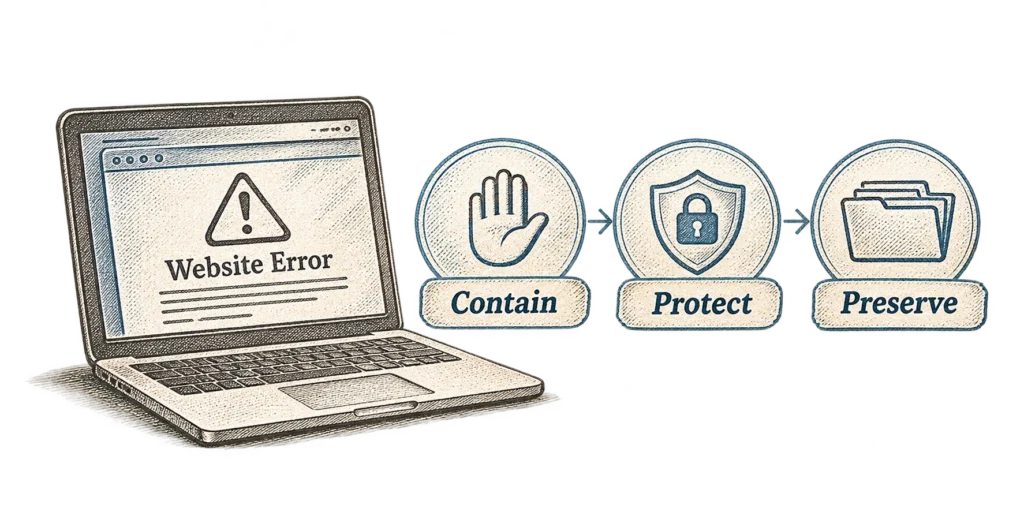
The initial response (not the one where you throw your computer into the trash) should balance three priorities:
1: Preventing further damage. 2: Protecting the website and its data. 3: Preserving information needed for the investigation.
If You are the Website Owner
Your immediate priorities are to:
– Document the problem. Save screenshots, warnings, relevant emails, and the approximate time of discovery.
– Contact your technical team Notify your developer, maintenance provider, hosting administrator, or security specialist.
– Avoid uncoordinated changes. Deleting files or restoring backups may interfere with the investigation.
– Explain the business impact. Identify affected services, customer interactions, or transactions.
– Agree on the next steps. Establish who is handling the incident and how updates will be communicated.
You do not need to understand every technical detail before reporting a credible concern.
If You are the Website Developer
Begin by assessing the urgency and available evidence.
This may involve:
– reviewing suspicious activity, logs, and recent changes;
– preserving relevant evidence and a protected copy of the affected environment;
– identifying ongoing threats and necessary access restrictions;
– coordinating immediate actions with the owner and hosting provider;
– involving additional security expertise when necessary.
A malicious redirect exposing visitors to harmful content may require immediate containment. An unfamiliar administrator account discovered during maintenance may call for a different response.
The evidence should guide the action.
What Has Been Affected?
Once immediate risks are being managed, attention turns to the scope of the incident:
How far did the problem extend?
Unauthorized changes may affect website files, plugins, themes, database records, user accounts, hosting infrastructure, or connected services.
The investigation needs to establish which components were affected, whether access remains possible, and how the compromise may have occurred.
Potential causes include compromised credentials, vulnerable software, insecure configurations, or weaknesses elsewhere in the hosting environment.
Understanding the Scope of the Compromise
On October 21, 2026, the PHP development team released security updates for PHP 8.2, 8.3, 8.4, and 8.5, addressing two critical vulnerabilities that could allow unauthenticated remote code execution.
The fixed releases are PHP 8.2.35, 8.3.36, 8.4.27, and 8.5.12. The PHP team recommended immediate updates, noting that no complete mitigations were available.
Source: PHP Security Releases, October 21, 2026.
Website owners should confirm their hosting environment’s PHP version, coordinate necessary security updates with their technical team, verify backups, and test essential functionality after upgrading.
Finding malicious code inside a plugin does not automatically mean the plugin itself was vulnerable. Replacing it without understanding how the code appeared may leave the underlying problem unresolved.
The official WordPress security documentation identifies software maintenance, access controls, and hosting configuration as important security considerations (Source: WordPress Developer Resources – Security).
The investigation should establish:
– Which components were modified or accessed?
– When did suspicious activity begin?
– Could personal information or connected services be affected?
– Is unauthorized access still possible?
– What evidence supports these findings?
Logs and technical records may be incomplete. Distinguishing confirmed findings, reasonable suspicions, and unresolved concerns helps the team make informed decisions.
What Does This Mean for Your Business?
The consequences depend on the website’s purpose and which services are affected.
A presentation website may experience limited disruption, while a business relying on online inquiries, transactions, bookings, or registrations may face more immediate consequences.
Malicious redirects and browser warnings can also affect customer trust.
If essential functionality becomes unavailable or unsafe, temporary alternatives may be necessary. A broken contact form could be replaced with another communication channel, while an affected online store may need to pause transactions until they can safely resume.
Customer communication should reflect what the investigation confirms.
WordPress websites may collect personal information through contact forms, accounts, registrations, and orders.
If an incident affects that information, the business needs to assess whether a personal data breach has occurred.
Under the European Union’s General Data Protection Regulation (GDPR), a breach may involve unauthorized access, disclosure, alteration, loss, or destruction of personal data.
Article 33 requires a data controller to notify the competent supervisory authority without undue delay and, where feasible, within 72 hours after becoming aware of a personal data breach, unless it is unlikely to result in a risk to individuals’ rights and freedoms.
Article 34 may also require notification of affected individuals when the breach is likely to result in a high risk, subject to applicable exceptions.
The European Data Protection Board explains that awareness generally begins when an organization has a reasonable degree of certainty that a security incident has occurred and compromised personal data.
Sources: GDPR, Articles 33 and 34; European Data Protection Board – Data Breaches.
Technical findings support this assessment, while appropriate legal or data protection expertise may also be necessary.
Coordinating the Response
Once a serious incident is confirmed, bring the responsible people together.
Depending on the website, this may involve the owner, developer, maintenance provider, hosting provider, or security specialist.
Establish:
– what is known and what needs immediate attention;
– who is responsible for each action;
– which business services need temporary alternatives;
– what conditions must be met before restoring public access.
One person should coordinate the response to prevent conflicting changes.
Maintenance agreements may already define responsibilities. Otherwise, identifying who has access and authority over each part of the environment becomes an immediate priority.
The goal is to contain the incident, protect users and data, restore essential services safely, and keep the investigation moving.
A WordPress Security Incident:
From Discovery to Response
We will return to our Monday morning scenario and follow what happens next.
Chapter 1: The Monday Morning Surprise

Monday morning starts with the usual coffee, but this time it comes with a blank homepage.
A few refreshes change nothing. The WordPress administration area is unavailable too.
The developer puts on the detective hat and reaches for the magnifying glass.
Or perhaps the keyboard and mouse. Much more practical.
Before assuming the worst, the developer checks the website in an isolated environment and compares it with the live version.
Logs, recent changes, files, and user accounts become pieces of the puzzle.
A failed update, plugin conflict, server error, or security incident could still explain what happened.
Nothing proves the website was hacked. Not yet.
Chapter 2: Something Does Not Add Up
An unfamiliar administrator account appears in WordPress.
Several website files no longer match their trusted versions.
Individually, these findings raise concerns. Together, they suggest something more serious.
The team preserves available evidence, verifies the suspicious account with the owner, and records unexpected file changes.
Meanwhile, screenshots, logs, calls, and messages begin flying between everyone involved.
Spooky.
But the blank homepage is no longer the real problem.
Someone appears to have been inside the website.
Troubleshooting has turned into an investigation.
Chapter 3: The First Difficult Decision
Now comes the uncomfortable part.
Some website functionality remains publicly accessible, but nobody can confirm that it is safe.
The business owner wants to minimize disruption. The developer worries about exposing visitors to further risks.
Keeping the website partially available may seem practical, but it could also leave visitors exposed.
After discussing the options, the team chooses containment.
Affected functionality is temporarily restricted, while customers are given another way to contact the business.
Not exactly how anyone expected to spend their Monday morning.
Chapter 4: Everyone Wants to Help
Just when the investigation gets more complicated, some good news arrives.
The hosting provider has backups!
Better yet, the developer has local copies of the website’s codebase.
But restoring a backup created after the compromise could bring the attacker’s unwanted surprises right back.
Everyone wants to help, but acting independently could make things worse.
Before anyone reaches for the imaginary Restore button, the team agrees on a coordinated approach.
They preserve evidence, verify the available backups, prepare trusted components, and address the identified security risks.
Restoration proceeds carefully, with essential functionality tested before reopening the website.
The affected environment remains isolated for further investigation.
One final page refresh…

Chapter 5: Back Online, but Not Quite Finished

The homepage appears again.
WordPress administration works.
After everything that happened, those ordinary little successes suddenly feel rather important. And rewarding, too!
For the website owner, business can begin returning to normal.
For the technical team, however, part of the investigation remains unfinished.
The restored website remains under closer monitoring as the investigation continues.
The coffee may be cold by now, but the website is back.
Getting it online again was an important milestone.
Phew.
But this was not the finish line.
Optionally, the developer can prepare an incident report documenting the findings, actions taken, and recommendations for future improvements.
Your WordPress Website Is Back Online. What Happens Next?
Restoring public access does not necessarily resolve every consequence of the incident.
If an earlier database was restored, recent orders, registrations, inquiries, or content updates may be missing and require reconciliation.
Unresolved findings should continue to be investigated, while monitoring helps identify renewed suspicious activity.
Any vulnerability or access mechanism that could allow the compromise to continue must be addressed before the website is considered safe to operate. Other investigative work may continue afterward if the remaining risks are appropriately controlled.
The official WordPress documentation recommends reviewing access controls and addressing the conditions that contributed to the compromise (Source: WordPress Documentation – FAQ My Site Was Hacked).
Recovery involves restoring the website safely and addressing the risks that could allow the incident to happen again.
Final Thoughts
Not every warning sign confirms a compromise, but suspicious activity deserves attention.
As our Monday morning story illustrates, even an unexpected incident can be approached methodically, with clear responsibilities and decisions guided by evidence rather than panic.
The next article in the WordPress Maturity series, How to Recover Your WordPress Website After an Attack, will explore the technical recovery process, including trusted components, vulnerability remediation, functionality testing, and monitoring after restoration.
How Mature Is Your WordPress Website?
A website can appear to be running normally while important responsibilities remain unclear.
Who manages updates and access permissions? Are backups available and regularly verified? Who responds when a security issue is discovered?
These questions become particularly important during an unexpected incident.
- Our WordPress Website Assessment helps you review your website through a short set of practical questions and receive an immediate result based on your answers.
- Use it to identify areas that deserve closer attention and better understand how well your current WordPress setup supports your business.