How to Recover
Your WordPress Website
After an Attack
Recovering a hacked WordPress website means restoring files and data, strengthening security, and making sure the website functions properly before reopening.
A cup of coffee will not make the attack vanish as if it never happened, but it might help you think more clearly as your day goes on.
In the previous article in our WordPress Maturity series, we discussed how to recognize a compromised website, respond to immediate risks, and understand the possible impact on a business. Once the immediate situation is under control, attention turns to recovering the website.
Every website is different, and so is the damage an attack can cause. The recovery process depends on what was affected and what can safely be restored. Developers, hosting teams, and website owners may all be involved.
In this article, we explore the main stages of website recovery and what each one involves.
Before Recovery: Establish a Safe Starting Point
Before starting recovery, save a copy of the affected website, including its files, database, and available logs. Document suspicious activity. (Source: WordPress Documentation – FAQ My Site Was Hacked)
This is where a little detective work begins. The team follows clues to find out what happened and what was affected.
Store the copy separately from the website being restored. It may contain malicious code, so it needs to be handled safely while the investigation continues.
If the attack is still ongoing, access to affected areas may need to remain restricted. Whenever possible, the team can work on a separate copy of the website and test repairs there before visitors return.
Can You Trust the Backup?
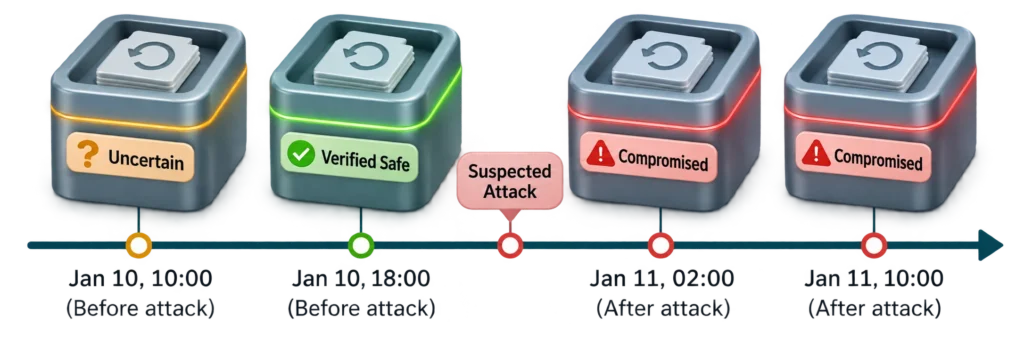
Some attacks go unnoticed for days or weeks, and backups created during that period may contain the same unwanted changes. Even a backup dated before the suspected attack may not be clean.
Check the Recovery Point
Compare backup dates with the suspected attack timeline and examine copies away from the live website, looking for:
– Suspicious or unexpectedly modified files.
– User accounts or published content that nobody on the team can confirm as legitimate.
– Unexpected changes to settings or database content.
A full WordPress restoration generally requires both website files and the database. Files contain themes, plugins, and uploads, while the database holds posts, users, and many settings. (Source: WordPress Developer Resources – Backups)
What Happens to Recent Website Data?
An older backup may leave out activity that happened after it was created. For an online store, that could mean lost orders and customer information. A service website could lose recent inquiries or registrations.
The team should identify what is missing and check whether those records can be recovered safely from another source. If every available backup contains suspicious changes, rebuilding the website and recovering its legitimate content separately may be the better route.
Restore WordPress From Trusted Components
Secure the recovery environment before rebuilding, restricting access and changing potentially exposed credentials as needed.
Rebuild the Software Foundation
Affected WordPress core files can be replaced using a fresh package downloaded directly from WordPress.org. (Source: WordPress Documentation – FAQ My Site Was Hacked)
Choose a supported WordPress version that addresses known security issues. Check that the website’s theme, plugins, and custom features will work with it. This is especially important when a major update is involved. (Source: WordPress Documentation – Updating WordPress)
The same approach applies to plugins and themes. Fresh packages should come from the official WordPress directories or the original trusted vendors. For custom-built features, developers can return to their own code repositories or other verified copies.
Technical Note: Replacing WordPress Files
Copying fresh files over existing ones can leave behind files added during the attack. Those extra files need to be identified and removed as part of the recovery. (Source: WordPress Documentation – FAQ My Site Was Hacked)
Recover Content and Configuration Carefully
Review uploaded files for malicious additions and database content for unauthorized changes to accounts, settings, or published content.
The investigation may also uncover problems with hosting or connected services. Replacing WordPress files will not fix those.
Regain Control and Strengthen Security
Address how the attacker gained or kept access. Depending on the investigation, this may involve:
– Review user access. Examine user accounts and their assigned privileges, then remove unauthorized accounts and correct inappropriate permissions.
– Review passwords and credentials. Change potentially exposed passwords and credentials for WordPress, hosting, the database, and other connected accounts.
– End existing login sessions. WordPress authentication keys and salts can be changed to invalidate existing login cookies. (Source: WordPress Developer Resources – wp_salt())
– Fix the weakness that was exploited. Update or replace affected software and correct unsafe settings.
– Check related systems when necessary. A compromised device or connected service may need attention as well.
Some changes may require help from the hosting provider or another service owner. WordPress recommends resetting access and investigating how the attacker got in. (Source: WordPress Documentation – FAQ My Site Was Hacked)
Validate the Website Before Reopening
After the repairs, the website needs to be checked for security issues and for everyday functionality. These are two different parts of the same recovery.
Security checks may uncover suspicious files, unexpected accounts, or changes that were missed earlier. Malware scans are useful here, alongside the other findings from the investigation.
Functionality testing should reflect how people actually use the website. For example:
– Business websites: Submit a contact form and confirm that the message arrives.
– Online stores: Test checkout, payment processing in a safe test environment, order records, and confirmation emails.
– Membership or booking websites: Check logins, registrations, and bookings.
– All websites: Test important pages and the tools people use to manage the site.
A contact form can show a success message even when the email never arrives. A store can look normal while customers cannot complete a purchase. These are the kinds of problems worth catching before reopening.
Keep a record of the tests and any issues still being resolved. The people responsible for the website can then make an informed decision about when to reopen it.
What Happens After the Website Is Restored?
Once the website is back online, closer monitoring is advisable. Depending on the investigation, watch for unusual logins, unexpected file changes, or suspicious requests. File integrity checks can help identify changes to WordPress components. (Source: WordPress Developer Blog – Website Security Checks)
Record the findings and repairs so the website owner can follow up on remaining issues.
If personal data may have been exposed, the organization also needs to consider its data-protection responsibilities. As discussed in the previous article, a hacked website does not automatically mean that a reportable personal data breach occurred.
The lessons from the incident can guide future decisions about updates, backups, and website maintenance.
Final Thoughts
A website recovery brings together several kinds of work. Developers may rebuild files and check the database. Hosting teams may help secure access. The website owner can help identify which features matter most to customers and colleagues.
The goal is to bring the website back with important functions working and known security problems addressed.
In the final article in our WordPress Maturity series, Build a Reliable WordPress Maintenance and Security Strategy, we will look at how regular updates, reliable backups, monitoring, and clear responsibilities support a website over time.
How Mature Is Your WordPress Website?
If your website were affected by a security incident, would you know which backups are available, who manages access, and who would coordinate the recovery?
- Our WordPress Website Assessment helps you review your website through a short set of practical questions and receive an immediate result based on your answers.
- Use it to identify areas that deserve closer attention and better understand how well your current WordPress setup supports your business.